Bellen
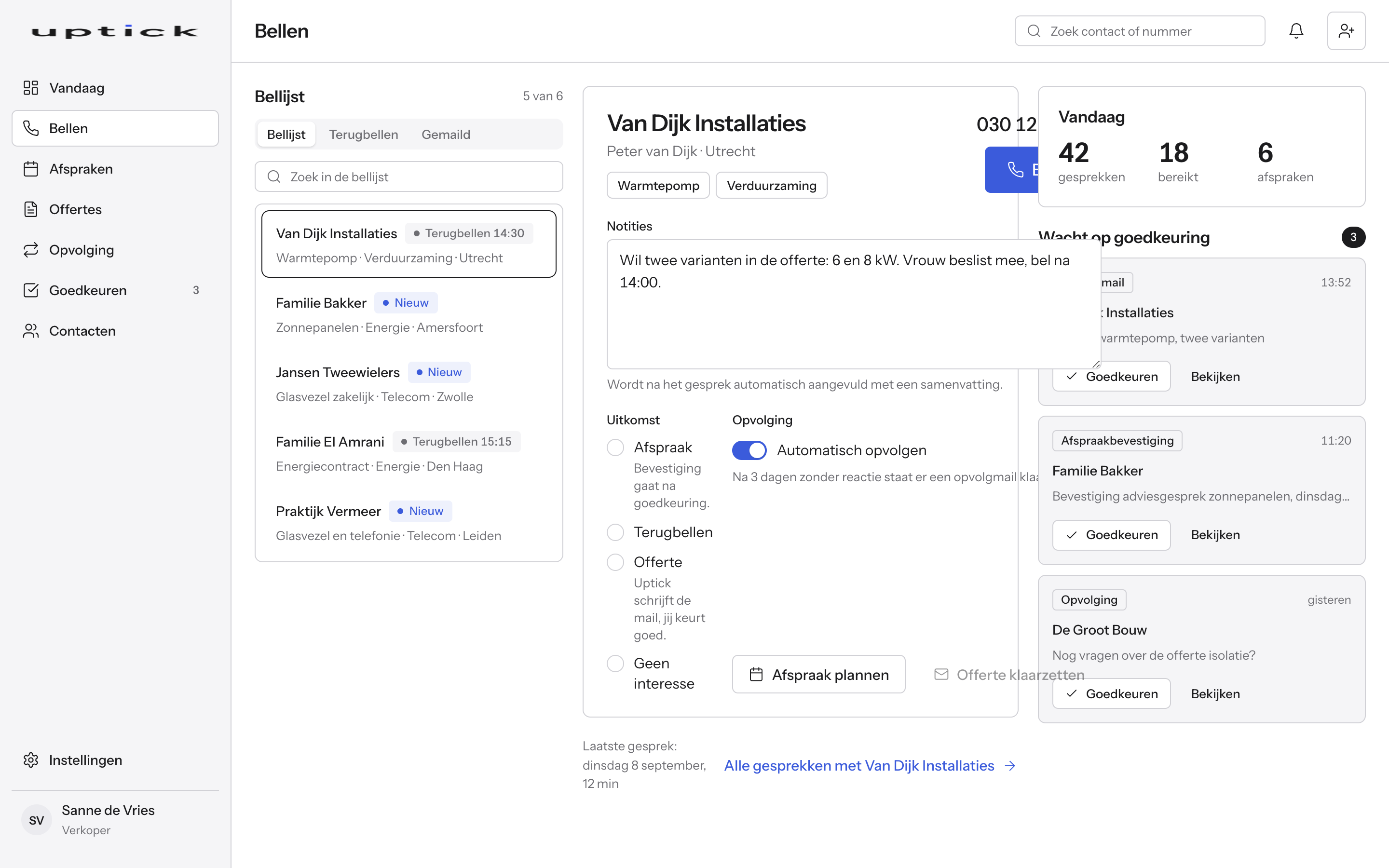
Nummer, dossier en eerdere notities staan al open.
Bekijk van dichtbij
Het product
Je team belt met een coach die meeluistert, terwijl Uptick de notitie, de offerte en de opvolging eromheen regelt en de pipeline laat zien waar elke lead staat.
Nummer, dossier en eerdere notities staan al open.
Bekijk van dichtbijElke lead in de stap van jouw proces waar hij hoort.
Bekijk van dichtbijVragen, richting en antwoorden op bezwaren, tijdens het gesprek.
Bekijk van dichtbijDe samenvatting staat klaar zodra je ophangt.
Bekijk van dichtbijLandt meteen in de agenda van wie het oppakt.
Bekijk van dichtbijDe mail met de besproken varianten staat klaar.
Bekijk van dichtbijVolgt vanzelf op via WhatsApp, mail of telefoon, stopt bij een reactie.
Bekijk van dichtbijEén lijst voor alles wat weg wil.
Bekijk van dichtbijWerkt boven op de systemen die je al hebt.
Bekijk van dichtbijVier stappen, geen handwerk ertussen.
Je verkoper belt vanuit de bellijst, dossier en notities staan al open en de coach luistert mee.
Uptick schrijft de samenvatting mee, klaar zodra het gesprek stopt.
Offerte, bevestiging of opvolging wacht in de goedkeuringslijst tot iemand akkoord geeft.
Na goedkeuring gaat het bericht naar de klant, via mail of WhatsApp, vastgelegd wie akkoord gaf.
Kies een onderdeel. Je ziet wat het doet en hoe het eruitziet.
Eén bellijst met drie tabs: te bellen, terugbellen en gemaild. Nummer, dossier en eerdere notities staan al open voor je opneemt.
Komt er een nieuwe lead binnen, dan gaat de eerste reactie zo snel mogelijk de deur uit: via WhatsApp, telefoon of mail, in de volgorde die jij kiest. De uitkomst van elk gesprek log je met één klik: afspraak, terugbellen, offerte of geen interesse.
De pipeline laat per stap van jouw proces zien welke leads erin zitten, wie ermee bezig is en wat de volgende actie is. De stappen zijn die van jouw organisatie, niet die van ons.
Een lead schuift vanzelf door zodra er iets gebeurt: gebeld, offerte verstuurd, getekend. Blijft er iets liggen, dan zie je dat meteen.
Onderdeel van de pakketten Live en Intelligence.
Tijdens het gesprek staat naast het dossier een paneel dat meeluistert. Het geeft je verkoper de volgende vraag en een richting, als een coach in je oor, in het Nederlands.
Noemt de klant een bezwaar, dan staat meteen het antwoord klaar dat bij jullie werkt. Koopsignalen licht de coach op zodra ze voorbijkomen.
Uptick luistert mee tijdens het gesprek en schrijft de samenvatting: uitkomst, vervolgstap en een eventuele afspraak.
Jij leest de notitie terug en past aan waar nodig. Alles staat leesbaar in het dossier.
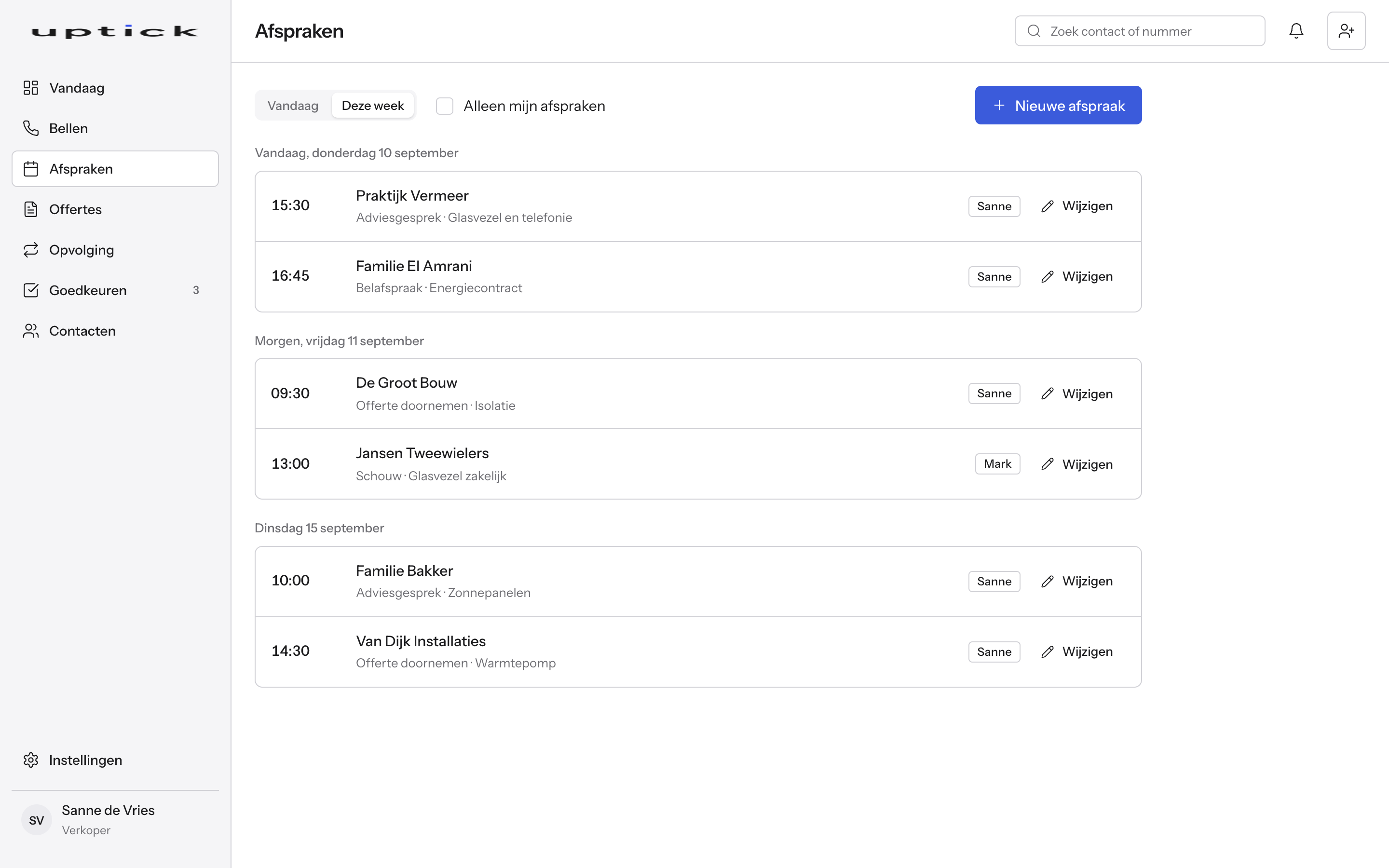
Een afspraak uit het gesprek landt direct in de agenda van wie hem oppakt: je verkoper zelf, of het team dat de volgende stap doet, zoals een adviseur of monteur. Met dag- en weekweergave per persoon.
Type schouw, adviesgesprek, belafspraak of offerte doornemen: de bevestiging en herinnering staan al klaar en wachten op goedkeuring.
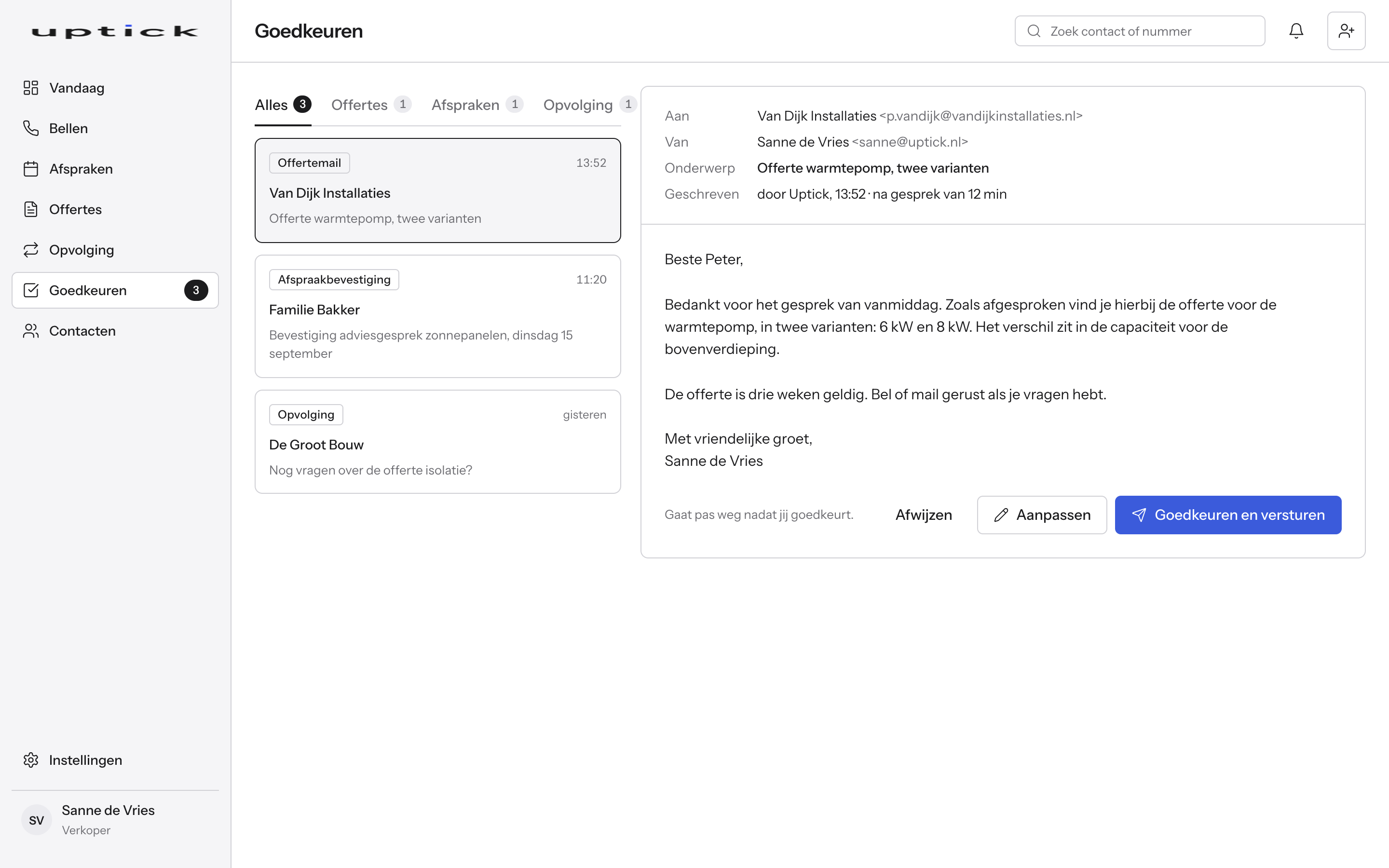
Na het gesprek schrijft Uptick de offertemail, met de varianten die besproken zijn. Hij linkt door naar je offertesysteem.
De mail wacht in de goedkeuringslijst tot iemand van je team hem controleert en verstuurt.
Reageert een lead niet binnen drie dagen, dan staat het volgende bericht al klaar: via WhatsApp, mail of een belafspraak. Een reeks per product, in jouw toon.
Hoe je funnel loopt, bepaal je zelf: welke kanalen, in welke volgorde en hoe snel. Dat stellen we samen in tijdens het gesprek.
Reageert iemand wel, dan stopt de reeks vanzelf en staat het gesprek weer bovenaan de bellijst. Ook leads die 'nu even niet' zeiden komen op het juiste moment terug.
Offertes, afspraakbevestigingen en opvolgmails komen samen in één goedkeuringslijst. Je ziet de preview precies zoals de klant hem krijgt.
Wijzig de tekst waar nodig, wijs af met een reden zodat Uptick herschrijft, of keur goed en verstuur met één klik.
Uptick koppelt met je CRM, offertesysteem, mail en agenda via hun API, of via onze eigen koppeling als een API ontbreekt. Uptick vervangt ze niet.
Welke koppelingen jij nodig hebt, bespreken we in het eerste gesprek. Contacten en bedrijven staan in één lijst, met rollen per gebruiker en je eigen logo in het dashboard.
Een mens keurt elk uitgaand bericht goed. Er gaat niets naar een klant voor iemand van je team het gelezen heeft. Wie wat goedkeurde staat vast in het dossier.
Elke offertemail, bevestiging en opvolging gaat eerst langs goedkeuring.
Pas de tekst aan in de preview en verstuur met één klik.
Wie wat goedkeurde staat vast in het dossier.
Staat je vraag er niet bij? Stel hem gerust in het gesprek.
Uptick is voor salesbedrijven die dagelijks bellen, in telecom, energie en verduurzaming. Van teams van vijf tot teams van honderden verkopers, de meeste klanten hebben tussen de 10 en 100 medewerkers.
Nee. Een mens keurt elk uitgaand bericht goed voor het naar een klant gaat. Wie goedkeurde staat vast in het dossier.
Uptick luistert mee tijdens het gesprek en schrijft de samenvatting. Jij leest hem terug en past aan waar nodig, alles blijft leesbaar in het dossier.
Tijdens het gesprek geeft de coach je verkoper de volgende vraag en een richting, en bij een bezwaar het antwoord dat bij jullie werkt. Alleen je verkoper ziet het, de klant merkt er niets van.
Agenda's koppel je via Google of Microsoft. Welke telefonie het beste past, bespreken we in het eerste gesprek.
De reeks stopt vanzelf en het gesprek staat weer bovenaan de bellijst van de verkoper.
Zo snel mogelijk na binnenkomst, via WhatsApp, telefoon of mail. Welke kanalen, in welke volgorde en hoe snel, bepaal je zelf. Dat stellen we samen in tijdens het gesprek.
Ja. Bij de start schrijven we de mailteksten samen met jou, in jouw toon. Daarna pas je losse mails aan in de preview, of wijs je af met een reden zodat Uptick herschrijft.
In een gesprek van dertig minuten laten we Uptick zien met jouw producten en jouw bellijst.
Plan een gesprekThe product
Your team calls with a coach listening in, while Uptick handles the note, the quote and the follow up around it and the pipeline shows where every lead stands.
Number, file and earlier notes are already open.
See it up closeEvery lead in the stage of your process where it belongs.
See it up closeQuestions, direction and answers to objections, during the call.
See it up closeThe summary is ready the moment you hang up.
See it up closeLands in the calendar of whoever picks it up.
See it up closeThe email with the discussed options is ready.
See it up closeFollows up by itself via WhatsApp, email or phone, stops on a reply.
See it up closeOne list for everything that wants to go out.
See it up closeWorks on top of the systems you already have.
See it up closeFour steps, no manual work in between.
Your rep calls from the call list, file and notes already open and the coach listens in.
Uptick writes the summary along the way, ready the moment the call ends.
Quote, confirmation or follow up waits in the approval list until someone approves.
After approval the message goes to the customer, by email or WhatsApp, recorded who gave the approval.
Pick a part to see what it does and what it looks like.
One call list with three tabs: to call, call back and emailed. Number, file and earlier notes are already open before you pick up.
When a new lead comes in, the first response goes out as fast as possible: via WhatsApp, phone or email, in the order you choose. You log the outcome of every call with one click: appointment, call back, quote or not interested.
The pipeline shows, per stage of your process, which leads are in it, who is working on them and what the next action is. The stages are those of your organisation, not ours.
A lead moves on by itself as soon as something happens: called, quote sent, signed. When something stalls, you see it right away.
Part of the Live and Intelligence plans.
During the call a panel next to the file listens in. It gives your rep the next question and a direction, like a coach in your ear, in Dutch.
When the customer raises an objection, the answer that works for you is right there. Buying signals light up as they come by.
Uptick listens in during the call and writes the summary: outcome, next step and any appointment.
You read the note back and edit where needed. Everything stays readable in the file.
An appointment from the call lands directly in the calendar of whoever picks it up: your rep, or the team that does the next step, such as an advisor or an installer. With a day and week view per person.
Type site visit, consultation, phone appointment or quote review: the confirmation and reminder are already written and wait for approval.
After the call Uptick writes the quote email, with the options you discussed. It links through to your quote system.
The email waits in the approval list until someone on your team checks and sends it.
No reply from a lead within three days? The next message is ready: via WhatsApp, email or a call. One sequence per product, in your tone.
How your funnel runs is up to you: which channels, in which order and how fast. We set it up together in the call.
If someone does reply, the sequence stops by itself and the call goes back to the top of the call list. Leads who said "not right now" also come back at the right moment.
Quotes, appointment confirmations and follow up emails come together in one approval list. You see the preview exactly as the customer gets it.
Edit the text where needed, reject with a reason so Uptick rewrites it, or approve and send with one click.
Uptick connects with your CRM, quote system, mail and calendar through their API, or through our own link when an API is missing. Uptick does not replace them.
Which connections you need, we discuss in the first call. Contacts and companies sit in one list, with roles per user and your own logo in the dashboard.
A human approves every outgoing message. Nothing goes to a customer before someone on your team has read it. Who approved what is recorded in the file.
Every quote email, confirmation and follow up first goes through approval.
Adjust the text in the preview and send it with one click.
Who approved what is recorded in the file.
Don't see your question? Ask it in the call.
Uptick is for sales companies that call every day, in telecom, energy and home sustainability. From teams of five to teams of hundreds of reps, most customers have between 10 and 100 employees.
No. A human approves every outgoing message before it goes to a customer. Who approved is recorded in the file.
Uptick listens in during the call and writes the summary. You read it back and edit where needed, everything stays readable in the file.
During the call the coach gives your rep the next question and a direction, and on an objection the answer that works for you. Only your rep sees it, the customer notices nothing.
Calendars connect through Google or Microsoft. Which telephony fits best, we discuss in the first call.
The sequence stops by itself and the call goes back to the top of the rep's call list.
As fast as possible after it comes in, via WhatsApp, phone or email. Which channels, in which order and how fast, you decide. We set it up together in the call.
Yes. At the start we write the email texts together with you, in your tone. After that you edit single emails in the preview, or reject one with a reason so Uptick rewrites it.
In a call of thirty minutes we show Uptick with your products and your call list.
Book a call